
Use the Company Group Security page to update a company's security on a project.
For instructions on adding a new company and inviting users, please see Inviting People to VPO.
- To update a company's project permissions:
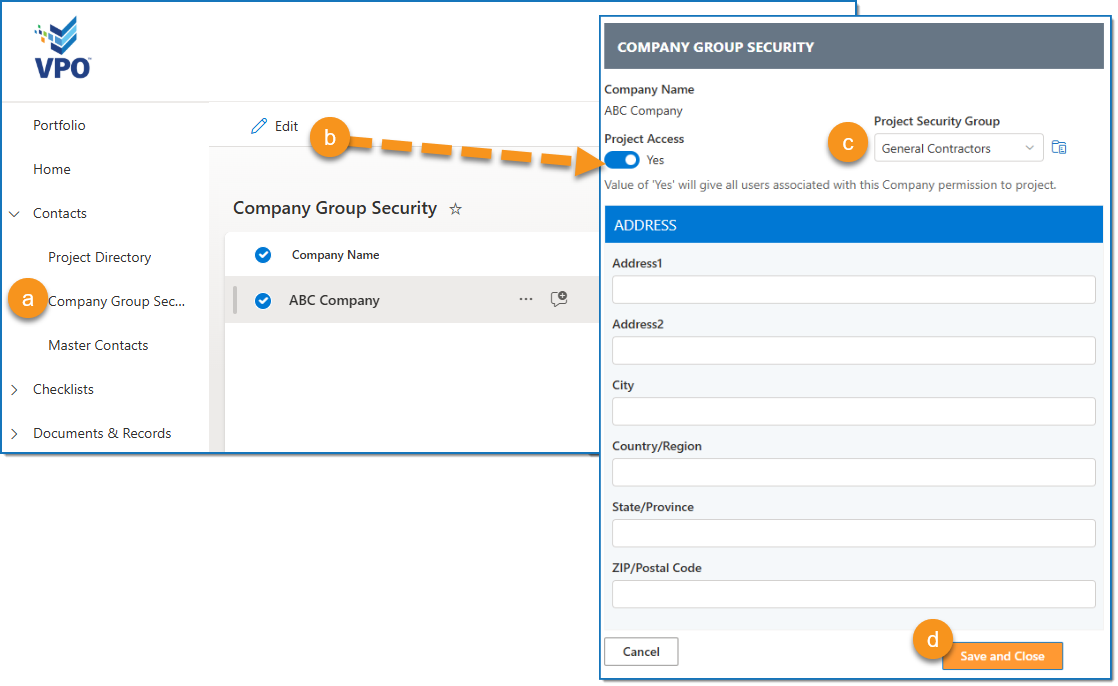
a. Open Company Group Security. This link usually appears in the navigation bar on the left side of the screen on the project homepage under ‘Contacts.'
b. Select the Company name and click Edit.
c. Update the Project Security group as needed, or to remove project access for this company, you can switch Project Access to 'No.' Everyone from this company in the Project Directory receives the same level of access to this project.
Note:
If you aren't sure which Project Security group to choose, review the Permissions Matrix, a guide to each security group's abilities usually pinned to the Portfolio homepage.
d. Click Save and Close.
The company's security level is automatically updated in the Project Directory, and the new permissions should take effect within a few minutes.
For questions or urgent access concerns, please contact us at support@vpo.freshdesk.com.